Data Refresh
Acceleration data can be refreshed (updated) by:
-
API: POST to
/v1/datasets/:name/acceleration/refresh. See Refresh Dataset HTTP API. -
Interval: Time-based refresh interval. See Refresh Interval.
-
Change Data Capture (CDC): CDC from a database using Debezium. See Change Data Capture.
-
Push: Spice-to-Spice Push over Apache Arrow DoExchange.
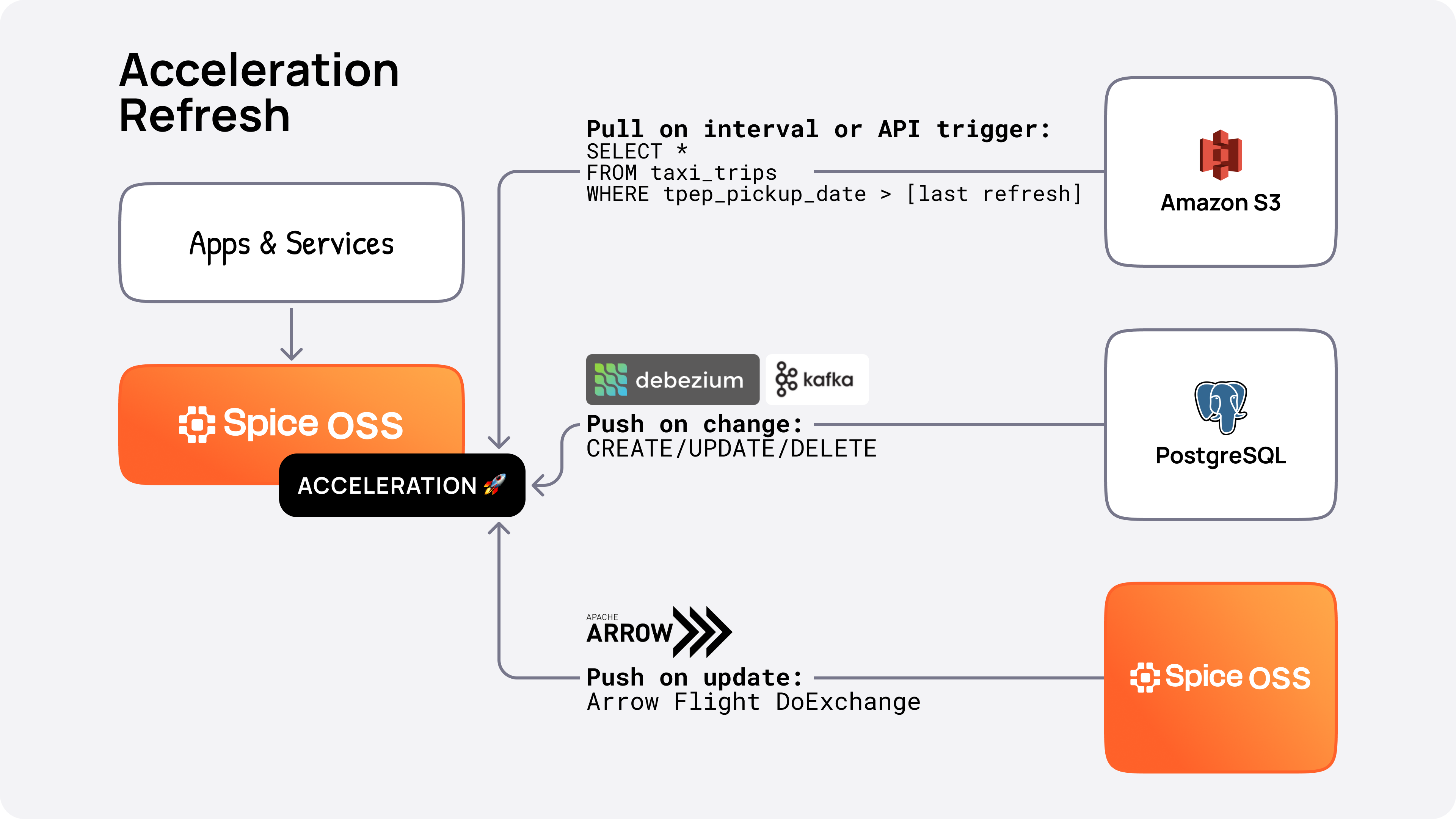 .
.
Refresh Modes
Spice supports five modes to refresh/update local data from a connected data source. full is the default mode.
| Mode | Description | Example |
|---|---|---|
full | Replace/overwrite the entire dataset on each refresh | A table of users |
append | Append/add data to the dataset on each refresh | Append-only, immutable datasets, such as time-series or log data |
changes | Apply incremental changes | Customer order lifecycle table |
caching | Read-through caching for SQL queries | API search results or dynamic content endpoints |
snapshot | Reload exclusively from the snapshot store | Read-only replicas bootstrapped from centralized snapshots |
Learn more about each mode:
Example:
datasets:
  - from: databricks:my_dataset
    name: accelerated_dataset
    acceleration:
      refresh_mode: full
      refresh_check_interval: 10m
Append
Using refresh_mode: append requires the use of a time_column dataset parameter, specifying a column to compare the local acceleration against the remote source. Data will be incrementally refreshed where the time_column value in the remote source is greater-than (gt) the max(time_column) value in the local acceleration. A date-typed time_column (time_format: date) is compared greater-than-or-equal (gte) against the start of that day instead, since every row of a day shares one value — see Day-Granular Time Columns.
E.g.
datasets:
  - from: databricks:my_dataset
    name: accelerated_dataset
    time_column: created_at
    acceleration:
      refresh_mode: append
      refresh_check_interval: 10m
Append-mode accelerations that define a time_column wait to report ready until the first append refresh completes after snapshot bootstrap. This keeps the dataset out of rotation until the freshest data is available while still benefiting from the snapshot-assisted startup.
If late arriving data or clock-skew needs to be accounted for, an optional overlap can also be specified. See acceleration.refresh_append_overlap.
time_partition_column
Datasets that are partitioned by a less-granular time-column (e.g. day, month, year) can also use the time_partition_column parameter in addition to the time_column parameter to specify the time-column to use for efficient partition pruning.
Example:
datasets:
  - from: databricks:my_dataset
    name: accelerated_dataset
    time_column: created_at
    time_format: iso8601
    time_partition_column: created_at_day
    time_partition_format: date
Append only modified files
Spice can automatically detect and append only newly created or updated files from object-store data sources. This is useful for append-only datasets where only new files are added to the source and existing files are not modified or deleted.
Enable this feature by setting either time_column or time_partition_column to the special value last_modified. When configured this way with refresh_mode: append, Spice will use the file/object's metadata to determine which files are new or have been updated.
This approach can drastically speed up incremental updates for large datasets, as Spice only needs to process the new files rather than scanning the entire dataset for changes to a column. This optimization is particularly valuable for datasets with many files or large file sizes.
If last_modified already exists as a column in the parquet data, that column will take precedence over the metadata value from the file itself.
Example using time_column:
datasets:
  - from: s3://my_bucket/my_dataset
    name: accelerated_dataset
    time_column: last_modified
    params:
      file_format: parquet
    acceleration:
      refresh_mode: append
      refresh_check_interval: 10m
Example using time_partition_column:
datasets:
  - from: s3://my_bucket/my_dataset
    name: accelerated_dataset
    time_column: created_at
    time_partition_column: last_modified
    params:
      file_format: parquet
    acceleration:
      refresh_mode: append
      refresh_check_interval: 10m
Appending modified files is only supported for datasets that support setting the file format parameter, such as s3://, abfs://, file://, etc.
Changes (CDC)
Datasets configured with acceleration refresh_mode: changes requires a Change Data Capture (CDC) supported data connector. Initial CDC support in Spice is supported by the Debezium data connector.
Caching
The caching refresh mode is designed for HTTP-based datasets where request metadata acts as cache keys. This mode is particularly useful for API responses that return multiple rows for a single request, such as search results or dynamic content endpoints.
See Caching Mode for detailed documentation and examples.
Snapshot
The snapshot refresh mode creates a read-only acceleration that reloads exclusively from the snapshot store. The federated data source is never queried for refreshes — instead, the runtime polls the snapshot store on a configurable interval and atomically swaps in newer snapshots when available.
snapshots:
  enabled: true
  location: s3://my-bucket/snapshots/
  params:
    s3_auth: iam_role

datasets:
  - from: postgres:public.my_table
    name: my_table
    acceleration:
      enabled: true
      engine: duckdb
      mode: file
      refresh_mode: snapshot
      refresh_check_interval: 30s  # Poll interval; defaults to 1m
      snapshots: enabled
      params:
        duckdb_file: /nvme/my_table.db
Requirements:
acceleration.snapshotsmust beenabledorbootstrap_only. Snapshot mode is a snapshot consumer only, so the two behave identically here: creation is skipped for the mode entirely and the dataset never publishes new snapshots — a separate writer must produce them.- The acceleration engine must be a snapshot-capable file-based engine: DuckDB, SQLite, Cayenne, or Turso
Behavior:
- On startup, the runtime bootstraps from the most recent snapshot (same as other snapshot-enabled modes). When no snapshot has been published yet, the dataset waits for the first one and restores it once a writer publishes it
- After bootstrap, the runtime polls the snapshot store at
refresh_check_interval(default: 60 seconds) for newer snapshots. On S3, an SQS queue of the location's event notifications reloads datasets as soon as a snapshot is published; see Reload on S3 event notifications - Each poll reads the snapshot store's metadata conditionally, sending the
ETagrecorded by the previous poll inIf-None-Match. When the store reports that the metadata is unchanged, the poll ends without downloading it - When a newer snapshot is found, its schema is validated against the current acceleration schema before downloading
- A poll reads the metadata once and uses that read for the snapshot id comparison, the schema validation, and the download, so the snapshot that is downloaded is the one whose schema was validated, even if a writer publishes another snapshot during the poll
- With
bootstrap_on_failure_behavior: retry, a failed download retries the whole poll. Each attempt reads the metadata again and validates the snapshot before downloading it, so a snapshot published to replace a broken one is picked up - A poll that does not load the current snapshot records no
ETag, so the next poll reads the metadata in full. This applies whenbootstrap_on_failure_behavior: warnskipped a failed download orfallbackloaded an older snapshot, and when the store's current snapshot id is older than the loaded one, in which case every poll logs thesnapshot metadata current id is older than the locally loaded snapshotwarning - The accelerator file is swapped atomically — queries continue to be served from the previous snapshot until the swap completes
INSERT,UPDATE,DELETE, andTRUNCATEstatements are all rejected with an error since the acceleration is driven exclusively from snapshots
Use refresh_mode: snapshot for read-only replicas that don't need direct access to the federated source — for example, edge nodes that receive snapshots from a centralized writer.
Ready State
Supported in refresh_mode | Any |
| Required | No |
| Default Value | on_load |
By default, Spice will return an error for queries against an accelerated dataset that is still loading its initial data. The endpoint /v1/ready is used in production deployments to control when queries are sent to the Spice runtime.
The ready state for an accelerated dataset can be configured using the ready_state parameter in the dataset configuration.
ready_state: on_load: Default. The dataset is considered ready after the initial load of the accelerated data. For file-based accelerated datasets that have existing data, this will be ready immediately. Queries against this dataset before the data is loaded will return an error.ready_state: on_registration: The dataset is considered ready when the dataset is registered in Spice, even before the initial data is loaded. Until the data is loaded, queries are served from an existing acceleration if there is one, and otherwise fall back to the federated source. Once the data is loaded, queries will be served from the acceleration.ready_state: on_schema_resolved: The dataset is considered ready once the federated source's schema has been resolved (which also verifies access to the source), without waiting for the initial data refresh. Until the initial load completes, queries are served from an existing acceleration if there is one, and otherwise fall back to the federated source. An existing acceleration does not make the dataset ready: readiness still waits for the source to be reached. Subsequent refresh failures are still reported via dataset status and metrics.
Example:
datasets:
  - from: s3://my_bucket/my_dataset
    name: my_dataset
    ready_state: on_load # or on_registration, on_schema_resolved
    acceleration:
      enabled: true
When queries must be served from a loaded acceleration, keep the defaults: dataset ready_state: on_load, runtime ready_state: on_load, and a Kubernetes readiness probe on /v1/ready. The pod stays out of rotation until the initial acceleration finishes.
ready_state: on_registration (and on_schema_resolved) reports ready before that load and sends queries to the federated source in the meantime. Combined with a fleet starting together, that is a startup stampede against the origin. on_zero_results: use_source has the same shape on the query path: an empty accelerated result is followed by a second query to the source. Leave both off when the deployment is meant to serve only warm data.
Serving an Existing Acceleration While the Source Is Unavailable
When an accelerated dataset already has data on disk from a previous run and meets the conditions below, Spice registers the dataset from that acceleration at startup and connects to the source in the background. Queries return the persisted data while the source is unavailable or slow to respond, and refreshes resume once the source is reached. This includes connectors that connect to their source when the dataset is created, such as PostgreSQL, MySQL, and DynamoDB. In Spice v2.3 and earlier, these datasets were not registered until the source answered: queries failed with table ... not found, and /v1/ready returned 503.
datasets:
  - from: postgres:public.orders
    name: orders
    params:
      pg_host: db.example.com
      pg_db: shop
      pg_user: spice_reader
      pg_pass: ${secrets:PG_PASSWORD}
    acceleration:
      enabled: true
      engine: cayenne
      mode: file
      refresh_check_interval: 10m
A dataset is served from its existing acceleration this way when its configuration meets every one of these conditions (waits_for_source_reason):
- The acceleration persists across restarts: the
postgresengine, or another engine withmode: fileormode: file_update. With engines other thanpostgres,mode: memorykeeps no data across restarts. - For every engine, including
postgres,modeis notfile_create, andmode: file_updateis used only withrefresh_mode: disabled. - The acceleration checkpoint records the acceleration's primary key. Checkpoints written by Spice v2.3 and earlier do not; see Upgrading from Earlier Versions.
- The dataset is read-only:
accessis notread_write. refresh_modeis notchangesorcaching, andappendis used only with atime_column. An unsetrefresh_moderesolves tochangesfor thedebeziumandcdcconnectors.- The dataset has no embedding columns or full-text search columns, and Drasi forwarding is not enabled.
- The source is not the
fileconnector. on_schema_changeisblock, the default.
A snapshot reader whose first acceleration snapshot download is still pending at startup is also not served this way.
Connectors that reach their source only when the dataset is first read, such as HTTP(S) and S3, already fell back to the existing acceleration when that first read failed, and they keep doing so, except while the checkpoint was written by an earlier version (see Upgrading from Earlier Versions).
A dataset with no existing acceleration to serve, such as one starting for the first time, is registered once its source is reached. Until then, its status is Error, queries fail with table ... not found, and /v1/ready returns 503. Spice retries the source with a backoff that starts at about one second and grows to at most five minutes between attempts, with no limit on attempts, and loads the dataset when the source answers. Rejected credentials and TLS failures are configuration errors: Spice logs them as an error and does not retry.
Readiness and Dataset Status While the Source Is Unavailable
Query availability and source health are reported separately: a dataset can serve its acceleration while its status is Error. With the default runtime ready_state: on_load, the dataset ready_state determines when /v1/ready returns 200:
Dataset ready_state | Queries while the source is unavailable | /v1/ready | Dataset status |
|---|---|---|---|
on_load | Served from the existing acceleration | 200 once registered | Ready at registration, Error after a failed connection attempt, Ready once reconnected |
on_registration | Served from the existing acceleration | 200 once registered | Ready at registration, Error after a failed connection attempt, Ready once reconnected |
on_schema_resolved | Served from the existing acceleration | 503 until the source is reached | Initializing at registration, Error after a failed connection attempt, Ready once reached |
/v1/ready stays 200 for on_load and on_registration after the status changes to Error, because runtime on_load readiness counts a dataset that has been Ready once. Two kinds of dataset do not follow this table, because the existing acceleration is not treated as loaded until a refresh completes in this process: a dataset with refresh_mode: append, a time_column, and snapshot bootstrapping enabled, and a dataset that reads acceleration snapshots (file_format: snapshot) before it restores one. Until that refresh completes, on_load is not ready and queries return an error. on_registration is ready at registration and on_schema_resolved is ready once the source is reached, but in both cases queries go to the federated source rather than the persisted data, so they fail while the source is unavailable.
refresh_on_startup keeps its meaning for refresh_mode: full. With auto, the persisted data is served and the next refresh follows the refresh schedule. With always, the persisted data is served until the source is reached and the startup refresh replaces it. The other eligible refresh modes ignore refresh_on_startup: append refreshes at startup once the source is reached, adding new data to the persisted data instead of replacing it, snapshot checks for a newer snapshot at startup, and disabled does not refresh.
Logs and Error Messages
While the source cannot be reached, the dataset status is Error with the cause in error_message from GET /v1/datasets?status=true. Spice logs a warning on the first failure and then at most every five minutes while the connection is retried:
WARN Failed to connect to the source for dataset orders. Serving data from the existing acceleration for orders while retrying the connection. <cause>
In these messages, orders is the dataset name and <cause> is the connector's error. A configuration failure that no retry resolves, such as rejected credentials or a TLS error, is logged as an error instead. It is logged at once, even when a transient failure was reported less than five minutes earlier:
ERROR Dataset 'orders' cannot connect to its source because of its configuration, so it is served from its existing acceleration and will not refresh until the configuration is fixed. <cause>
When a dataset with data on disk waits for its source because of its configuration (the access, refresh_mode, search column, Drasi, file connector, mode, or on_schema_change conditions above), Spice logs the configuration that requires it when the first load attempt fails, and the dataset's error_message starts with Not served. The log message is not emitted for a snapshot reader whose first snapshot download is pending:
INFO Dataset 'orders' waits for its source before serving because it uses `refresh_mode: changes`. See: https://spiceai.org/docs/features/data-acceleration/data-refresh
Not served: waits for its source because it uses `refresh_mode: changes`. Cause: <cause>
A dataset that waits only because its checkpoint was written by an earlier version produces neither message. Its error_message is the connector's error, and the checkpoint is reported only in a DEBUG log: The acceleration checkpoint for dataset orders does not record its primary key (written by an earlier version), so it waits for its source before serving.
Monitoring Freshness
GET /v1/datasets?status=true includes two RFC 3339 timestamps for accelerated datasets (DatasetInfo):
last_refresh: when the last successful refresh completed, matching thedataset_acceleration_last_refresh_unix_time_msmetric. It is restored from the acceleration checkpoint at startup, so it is available while the source is unavailable. Datasets that create acceleration snapshots or were restored from one report it once a refresh completes.next_refresh: when the next scheduled refresh is due. It is present only when a refresh is scheduled byrefresh_check_intervalorrefresh_cron. An interval schedule includes refresh jitter. A cron schedule reports the next cron time, then the jittered start time once the refresh is triggered. A pending or unsuccessful refresh keeps its due time, even after that time has passed, until a refresh succeeds. A synchronizedlocalpod:dataset reports the schedule of the parent that refreshes it.
For example, with other fields omitted:
[
  {
    "name": "orders",
    "acceleration_enabled": true,
    "status": "Ready",
    "last_refresh": "2026-10-07T21:36:44.512189Z",
    "next_refresh": "2026-10-07T21:46:51.204Z"
  }
]
Upgrading from Earlier Versions
Acceleration checkpoints written by Spice v2.3 and earlier do not record the acceleration's primary key. A dataset with such a checkpoint waits for its source at startup, including a dataset whose connector previously fell back to its acceleration when the first read failed. This continues on every restart until the checkpoint is rewritten with the primary key. A completed refresh rewrites it, and so does a snapshot created by the snapshots_trigger: time_interval trigger, which checkpoints on its own schedule. Reconnecting to the source does not rewrite it. A refresh_mode: full dataset with refresh_on_startup: auto, no refresh_check_interval or refresh_cron, unchanged refresh_sql, and no time-interval snapshot creation does not rewrite its checkpoint after startup, so the checkpoint stays in the old format. To migrate such a dataset, run a refresh while the source is available, for example with Refresh On-Demand, or start it once with refresh_on_startup: always. After a refresh completes, later restarts serve the existing acceleration without waiting.
ready_state: on_schema_resolved now keeps /v1/ready at 503 until the source is reached, including for connectors that reach their source on first read. In Spice v2.3 and earlier, a dataset whose connector reaches its source on first read, such as HTTP, reported Ready and /v1/ready returned 200 once it fell back to its acceleration, even though the source was unavailable. A deployment that uses /v1/ready to admit traffic keeps that instance out of rotation until the source is reached. Use ready_state: on_load or on_registration when readiness should depend on the existing acceleration rather than the source.
Fast Cold Starts with Snapshots
File-based acceleration engines (DuckDB, SQLite, Cayenne, or Turso) can rely on acceleration snapshots to download a pre-built database file on startup instead of waiting for the first refresh to finish. Configure a shared snapshot location under the top-level snapshots block and opt individual datasets in with acceleration.snapshots: enabled, bootstrap_only, or create_only. Snapshots are stored using Hive-style partitions (month=YYYY-MM/day=YYYY-MM-DD/dataset=<name>) and are only supported when each dataset writes to its own acceleration file.
Filtered Refresh
Typically only a working subset of an entire dataset is used in an application or dashboard. Use these features to filter refresh data, creating a smaller subset for faster processing and to reduce the data transferred and stored locally.
- Refresh SQL - Specify the filter as arbitrary SQL to be pushed down to the remote source.
- Refresh Data Window - Filters data from the remote source outside the specified time window.
Refresh SQL
Supported in refresh_mode | Any |
| Required | No |
| Default Value | Unset |
Refresh SQL supports specifying filters for data accelerated from the connected source using arbitrary SQL.
Filters will be pushed down to the remote source when possible, so only the requested data will be transferred over the network.
Example:
datasets:
  - from: databricks:my_dataset
    name: accelerated_dataset
    acceleration:
      enabled: true
      refresh_mode: full
      refresh_check_interval: 10m
      refresh_sql: |
        SELECT * FROM accelerated_dataset WHERE city = 'Seattle'
The refresh_sql parameter can be updated at runtime on-demand using PATCH /v1/datasets/:name/acceleration. This change is temporary and will revert to the spicepod.yml definition at the next runtime restart.
Columns can be selected in the query via the SELECT clause, but only column names are supported. Arbitrary expressions or aliases are not supported.
Example:
curl -i -X PATCH \
     -H "Content-Type: application/json" \
     -d '{
           "refresh_sql": "SELECT city, state FROM accelerated_dataset WHERE city = 'Bellevue'"
         }' \
     127.0.0.1:8090/v1/datasets/accelerated_dataset/acceleration
Queries that return zero results will fallback to the behavior specified by the on_zero_results parameter, and will not have the refresh_sql applied to the results from the fallback. The refresh_sql only applies to acceleration refresh tasks.
refresh_sql applies on the initial refresh and every later one.
For the complete reference, view the refresh_sql section of datasets.
- When
refresh_mode: changesis specified, Refresh SQL can only modify the selected columns and cannot apply filters. - Running queries while using refresh SQL will not fallback to the source if any query returns more than zero rows, even when querying against columns that are not explicitly filtered by the refresh SQL. This may result in queries returning partial data, depending on the filters applied in the refresh SQL.
- Refresh SQL only supports filtering data from the current dataset - joining across other datasets is not supported.
- Refresh SQL modifications made via API are temporary and will revert after a runtime restart.
Refresh Data Window
Supported in refresh_mode | full, append |
| Required | No |
| Default Value | Unset |
The refresh_data_window parameter supports refreshing data that falls within the specified time window. The refresh_data_window is applied cumulatively to any filters specified by the refresh_sql, and applies a time filter based on now() - refresh_data_window. For example, the following configuration:
time_column: column_time
acceleration:
  refresh_sql: "SELECT * FROM my_dataset WHERE column_one = 'value'"
  refresh_data_window: 1d
In this example, refresh_data_window is converted into an effective Refresh SQL of SELECT * FROM my_dataset WHERE column_one = 'value' AND column_time > (now() - interval '1' day). The time_column column can be specified in the refresh_sql in conjunction with the refresh_data_window, and both filters are combined with AND.
This parameter relies on the time_column dataset parameter specifying a column that is a timestamp type. Optionally, the time_format can be specified to instruct the Spice runtime on how to interpret timestamps in the time_column.
Example with refresh_sql:
datasets:
  - from: databricks:my_dataset
    name: accelerated_dataset
    time_column: created_at
    acceleration:
      enabled: true
      refresh_mode: full
      refresh_check_interval: 10m
      refresh_sql: |
        SELECT * FROM accelerated_dataset WHERE city = 'Seattle'
      refresh_data_window: 1d
This example will only accelerate data from the federated source that matches the filter city = 'Seattle' and is less than 1 day old.
Example with on_zero_results:
datasets:
  - from: databricks:my_dataset
    name: accelerated_dataset
    time_column: created_at
    acceleration:
      enabled: true
      refresh_mode: full
      refresh_check_interval: 10m
      refresh_sql: |
        SELECT * FROM accelerated_dataset WHERE city = 'Seattle'
      refresh_data_window: 1d
      on_zero_results: use_source
This example will only accelerate data from the federated source that matches the filter city = 'Seattle' and is less than 1 day old. If a query against the accelerated data returns zero results, the query will fallback to the source and return the direct results without any filtering.
If a query against the accelerated data returns some results, the query will not fall back. For example, attempting to query for the last 2 days of data would only return the last 1 day of data without falling back.
Cold start with append
With refresh_mode: append, the first load is already windowed — Spice pulls WHERE time_column > now() - refresh_data_window. retention_period only ages out rows already in the acceleration; it does not backfill extra history on first load. To load more history at cold start, use an additional dataset or a wider refresh_data_window. refresh_sql applies on the initial refresh and every later one.
Behavior on Zero Results
Supported in refresh_mode | full, append |
| Required | No |
| Default Value | return_empty |
on_zero_results is ignored when refresh_mode: caching is set. Caching mode always queries the source on a cache miss, regardless of this setting. Remove on_zero_results from caching-mode dataset configurations to silence the runtime warning.
By default, accelerated datasets only return locally materialized data. If this local data is a subset of the full dataset in the federated source—due to settings like refresh_sql, refresh_data_window, or retention policies—queries against the accelerated dataset may return zero results, even when the federated table would return results.
To address this, on_zero_results: use_source can be configured in the acceleration configuration. Queries returning zero results will fall back to the federated source, returning results from querying the underlying data.
Rows removed by a retention policy are the exception. The fallback query excludes them, so a row that retention_sql or retention_period evicted is not read back from the source. See Fallback with a Retention Policy.
on_zero_results:
return_empty(Default) - Return an empty result set when no data is found in the accelerated dataset.use_source- Fall back to querying the federated table when no data is found in the accelerated dataset.
Example:
datasets:
  - from: databricks:my_dataset
    name: accelerated_dataset
    acceleration:
      enabled: true
      refresh_sql: SELECT * FROM accelerated_dataset where city = 'Seattle'
      on_zero_results: use_source
In this example a query against accelerated_dataset within Spice like SELECT * FROM accelerated_dataset WHERE city = 'Portland' would initially query against the accelerated data, see that it returns zero results and then fallback to querying against the federated table in Databricks.
- It is possible that even though an accelerated table returns some results, it may not contain all the data that would be returned by the federated table.
on_zero_resultsonly controls the behavior in the simple case where no data is returned by the acceleration for a given query. - A subquery predicate does not take part in the zero-results decision. The fallback check runs at the accelerator's scan, below the join that a subquery is rewritten into, so a filter containing
IN (SELECT …),EXISTS (…),ANY/ALL, a correlated column reference, orUNNESTis left above the scan and the decision is made without it. When the acceleration is a subset of the source and holds any rows at all, the unfiltered scan is non-empty, fallback does not fire, and a query whose only filter is such a subquery can return an empty result even though the source has a matching row. Adding a filter the scan can evaluate itself (for exampleWHERE id = 2 AND id IN (SELECT …)) restores the fallback. use_sourcedoubles the cost of an empty accelerated result and sends that second query to the origin. For a deployment that should serve only warm acceleration, keep the defaultreturn_emptyand gate traffic with readiness.
Fallback with a Retention Policy
When a dataset configures retention_sql or retention_period, Spice adds the inverse of the retention policy to the fallback query, so the source returns only rows that retention would keep in the acceleration. Without this filter, a lookup for a soft-deleted or expired key would find nothing in the acceleration, fall back, and return the row that still exists in the source. Keys that the acceleration never loaded and that retention would keep still fall back as before.
The inverse follows SQL three-valued logic. For retention_sql: DELETE FROM t WHERE <predicate>, the fallback keeps a source row when <predicate> is not true (NOT (<predicate>) OR <predicate> IS NULL), which is what the DELETE leaves behind. For retention_period, the fallback keeps rows whose time_column is at or after now() - retention_period, and rows whose time_column is NULL. When both settings are configured, a source row must pass both. The filter applies whenever these settings are configured, including when retention_check_enabled is false.
For example, with the following configuration, SELECT * FROM user_events WHERE user_id = 42 returns no rows after the retention check evicts an archived row for user 42, even though the row is still in MySQL:
datasets:
  - from: mysql:user_events
    name: user_events
    acceleration:
      enabled: true
      engine: cayenne
      on_zero_results: use_source
      retention_check_enabled: true
      retention_check_interval: 5m
      retention_sql: DELETE FROM user_events WHERE status = 'archived'
The inverse must be a filter that Spice can plan against the source columns. When it is not, for example when time_column has a type that cannot be used as a source filter or the retention_sql predicate does not type-check against the source schema, the dataset fails to load rather than return evicted rows. The error begins:
Failed to register dataset 'user_events' (mysql): `on_zero_results: use_source` cannot be combined with this retention configuration, so the dataset was not loaded.
To resolve it, remove on_zero_results: use_source, or use a retention_sql or retention_period policy that can be evaluated as a filter on the source columns.
Earlier releases do not apply the retention policy to the fallback query, so on those releases on_zero_results: use_source can return soft-deleted and expired rows from the source.
Refresh on Startup
| Parameter | Value |
|---|---|
Supported in refresh_mode | Any |
| Required | No |
| Default Value | auto |
Controls the refresh behavior of an accelerated dataset across restarts.
refresh_on_startup Options:
auto(Default) – Maintains refresh state across restarts:- With
refresh_check_interval: Schedules next refresh based on last successful refresh time, triggering immediately if interval has already elapsed - Without
refresh_check_interval: No refresh (on-demand only)
- With
always– Forces a dataset refresh on every startup, regardless of the existing acceleration state.
Setting refresh_on_startup: always ensures that accelerated data is always refreshed to match the source when the service restarts. This is useful in development environments or when data consistency is critical after deployment.
Example Configuration:
datasets:
  - from: databricks:my_dataset
    name: accelerated_dataset
    acceleration:
      enabled: true
      refresh_on_startup: always
For the complete reference, view the refresh_on_startup section of datasets.
Refresh Interval
Supported in refresh_mode | full, append |
| Required | No |
| Default Value | Unset |
The refresh_check_interval parameter controls how often the accelerated dataset is refreshed.
Example:
datasets:
  - from: spice.ai/spiceai/quickstart/datasets/taxi_trips
    name: taxi_trips
    acceleration:
      enabled: true
      refresh_mode: full
      refresh_check_interval: 10s
This configuration will refresh taxi_trips data every 10 seconds.
Keep the interval aligned with the freshness SLA and with what the origin can serve. A shorter interval increases source load even when query serving is isolated from the refresh workers — see Isolating refresh from queries.
Isolating refresh from queries
By default the runtime runs acceleration refresh on a dedicated low-priority thread pool (refresh-worker), separate from the pool that executes queries. CDC apply (refresh_mode: changes) runs on its own default-priority pool (cdc-apply-worker) when any dataset streams changes, so a bulk refresh does not deprioritize the apply loop. Cayenne compaction runs on compaction-worker when a dataset can produce files to compact.
The pools still share the machine's CPU and memory. A full refresh can raise latency if it saturates the node or the query memory pool. Leave the default in place, and set runtime.params.dedicated_thread_pool: disabled only when a single shared pool is intentional — that puts refresh back on the query runtime. See dedicated_thread_pool.
For a stronger split, run ingest on a cluster and serve lookups from sidecars. The sidecars do not refresh from the origin. See Cluster-Sidecar.
Refresh On-Demand
Supported for accelerators with a refresh_mode of full or append.
Accelerated datasets can be refreshed on-demand via the refresh CLI command or POST /v1/datasets/:name/acceleration/refresh API endpoint.
CLI example:
spice refresh eth_recent_blocks
API example using cURL:
curl -i -XPOST 127.0.0.1:8090/v1/datasets/eth_recent_blocks/acceleration/refresh
with response:
HTTP/1.1 201 Created
content-type: application/json
content-length: 55
date: Thu, 11 Apr 2024 20:11:18 GMT

{"message":"Dataset refresh triggered for eth_recent_blocks."}
On-demand refresh always initiates a new refresh, terminating any in-progress refresh for the dataset.
Refresh Schedules
Supported in refresh_mode | full, append |
| Required | No |
| Default Value | Unset |
The refresh_cron parameter supports specifying a cron schedule which controls when datasets refresh.
Example:
datasets:
  - from: spice.ai/spiceai/quickstart/datasets/taxi_trips
    name: taxi_trips
    acceleration:
      enabled: true
      refresh_mode: full
      refresh_cron: '0 12 * * 1-5'
This configuration will refresh taxi_trips data at midday every weekday. For more information about cron schedules, see the cron schedule reference.
The refresh_cron parameter cannot be specified in conjunction with a refresh_check_interval parameter.
Refresh Retries
Supported in refresh_mode | full, append |
| Required | No |
Default refresh_retry_enabled | true |
Default refresh_retry_max_attempts | Unset |
By default, data refreshes for accelerated datasets are retried on transient errors (connectivity issues, compute warehouse goes idle, etc.) using a Fibonacci backoff strategy.
A listed Parquet object that is overwritten while a refresh scan is reading it also counts as transient. Scans pin a single object generation (via the object store's version id, or an If-Match on the listed ETag), so the overwrite surfaces as a precondition failure rather than as a mix of rows from two generations or a decoder error. The refresh relists, replans and retries. These attempts are counted on dataset_acceleration_refresh_errors under reason="object_generation_changed", so an expected overwrite cadence can be filtered out without also hiding genuine parquet_decode corruption.
Retry behavior can be configured using the acceleration.refresh_retry_enabled and acceleration.refresh_retry_max_attempts parameters.
Example: Disable retries
datasets:
  - from: spice.ai/spiceai/quickstart/datasets/taxi_trips
    name: taxi_trips
    acceleration:
      refresh_retry_enabled: false
      refresh_check_interval: 30s
Example: Limit retries to a maximum of 10 attempts
datasets:
  - from: spice.ai/spiceai/quickstart/datasets/taxi_trips
    name: taxi_trips
    acceleration:
      refresh_retry_max_attempts: 10
      refresh_check_interval: 30s
Retention Policy
Supported in refresh_mode | full, append |
| Required | No |
Default retention_check_enabled | false |
Default retention_period | Unset |
Default retention_sql | Unset |
Default retention_check_interval | Unset |
Accelerated datasets can be configured to automatically evict data using two different retention strategies:
Time-based Retention
Automatically evict time-series data exceeding a retention period by setting a retention policy based on the configured time_column and acceleration.retention_period.
The policy is set using the acceleration.retention_check_enabled, acceleration.retention_period and acceleration.retention_check_interval parameters, along with the time_column and time_format dataset parameters.
When retention_check_enabled is set to true, retention_check_interval is required, along with either retention_period (with a time_column) or retention_sql. Setting both applies both policies on every check.
A dataset that enables retention but leaves out one of these settings gets no scheduled retention pass, and the runtime logs a [retention] error naming the dataset and the missing setting rather than starting nothing quietly. There are three such refusals:
- Neither
retention_periodnorretention_sqlis set to a valid value, so nothing says which rows to delete. retention_periodis set buttime_columnis not, so there is nothing to compare against the cutoff.retention_check_intervalis missing or is not a valid duration. It has no default, so this is one unset field away from any otherwise-complete policy.
retention_check_enabled: false stays silent — asking for no retention is not a policy that failed to assemble.
Example:
datasets:
  - from: mysql:user_events
    name: user_events
    time_column: created_at
    acceleration:
      enabled: true
      refresh_mode: append
      retention_check_enabled: true
      retention_period: 30d
      retention_check_interval: 1h
Custom SQL-based Retention
Evict data from an acceleration based on custom filter predicates using the acceleration.retention_sql parameter. This is useful for scenarios like soft-deleting rows in append datasets or removing data based on complex business logic.
The retention_sql parameter takes the form of a DELETE FROM <table> WHERE <predicates> statement.
Example - Soft delete retention:
datasets:
  - from: mysql:user_events
    name: user_events
    time_column: updated_at
    acceleration:
      enabled: true
      engine: cayenne
      refresh_mode: append
      refresh_append_overlap: 10m
      primary_key: user_id
      retention_check_enabled: true
      retention_check_interval: 5m
      retention_sql: DELETE FROM user_events WHERE status = 'archived'
The time_column must change when a row is updated, as updated_at does here. An append refresh reads only rows whose time_column is newer than the latest stored value, less refresh_append_overlap (from the start of that day, for a day-granular column). With a column that does not change, such as created_at, a row archived after it falls outside that window is not re-read, so retention_sql never sees its new status.
- Time-based retention (
retention_period) and custom SQL retention (retention_sql) can be used independently or together. When both are configured, both retention policies will be applied during each retention check.
End-to-End Incremental Ingestion Example
The following example combines the pieces above into a single configuration for keeping an accelerated dataset incrementally up-to-date from a source that supports soft deletes:
refresh_mode: appendwith atime_columnfor incremental queriesrefresh_check_intervalto poll for new/changed rowsrefresh_append_overlapto tolerate clock skew and late-arriving rows without missing dataprimary_keyso a row updated in the source replaces the accelerated copy instead of duplicating it. Spice Cayenne keeps the newest version of each key bytime_column, becauseupdated_atis not part of theprimary_keyretention_periodto bound the working set by timeretention_sqlto evict soft-deleted rows (deleted_at IS NOT NULL)
datasets:
  - from: postgres:public.orders
    name: orders
    time_column: updated_at
    acceleration:
      enabled: true
      engine: cayenne
      mode: file
      refresh_mode: append
      refresh_check_interval: 1m
      refresh_append_overlap: 5m
      primary_key: id
      retention_check_enabled: true
      retention_check_interval: 10m
      retention_period: 90d
      retention_sql: DELETE FROM orders WHERE deleted_at IS NOT NULL
With this configuration Spice bootstraps from the source, then every minute fetches rows where updated_at > max(updated_at) - 5m and keeps the newest version of each id. Rows older than 90 days — or rows the source has soft-deleted — are evicted on the retention check.
For an Iceberg append/soft-delete log, this same shape — accelerate the log once, optionally accelerate a view that filters tombstones, bound disk with retention on the log, and prefer cluster acceleration plus a sidecar SQL results cache rather than re-accelerating the log on every node — is documented under Current state from an append-only log. An accelerated view does not compact the log by itself.
Refresh Jitter
Supported in refresh_mode | full, append |
| Required | No |
Default refresh_jitter_enabled | false |
Default refresh_jitter_max | Unset |
Accelerated datasets can include a random jitter in their refresh interval to prevent the Thundering herd problem, where multiple datasets refresh simultaneously. The jitter is a random value between 0 and refresh_jitter_max, which is added to or subtracted from the base refresh_check_interval. If refresh_jitter_max is not specified, it defaults to 10% of refresh_check_interval.
Refresh Jitter applies to the initial dataset load. If multiple similarly configured Spice instances are restarted at the same time, they will load with a jitter between 0 and refresh_jitter_max.
Example:
datasets:
  - from: spice.ai/spiceai/quickstart/datasets/taxi_trips
    name: taxi_trips
    acceleration:
      refresh_check_interval: 10s
      refresh_jitter_enabled: true
      refresh_jitter_max: 1s
In the configuration above:
- The initial load will include a random delay between 0 and 1 second.
- Subsequent refresh intervals will vary randomly between 9 seconds and 11 seconds.
Refresh jitter configuration:
Configuration Examples
Accelerating a full set of data that sometimes changes
In this example, Spice connects with a dataset that changes infrequently and is not configured for CDC. For example, a list of product categories.
datasets:
  - from: mysql:product_categories
    name: product_categories
    acceleration:
      refresh_mode: full
      refresh_check_interval: 8h
In this scenario, Spice uses a simple acceleration configuration - full refreshes on an 8 hour schedule. No additional behaviors are enabled, so queries matching for new product codes will return no results until the next refresh cycle.
Accelerating a subset of data that changes frequently
In this example, Spice connects with a dataset that has frequently changing data that is not configured for CDC. For example, user's posts on a social media platform.
datasets:
  - from: mysql:posts
    name: posts
    acceleration:
      refresh_mode: full
      refresh_check_interval: 10m
      refresh_sql: "SELECT * FROM posts WHERE updated_at > now() - interval '1' day"
      on_zero_results: use_source
With this configuration, Spice will refresh every 10 minutes accelerating posts that have been updated in the last day.
When querying for posts by direct ID, if a post is not accelerated Spice will fallback to retrieving the post from the non-accelerated source due to the behavior of on_zero_results: use_source.
However, if querying for a range of posts that includes some which have updated in the last day Spice will only return those results without falling back to the source. This could result in queries for a range of posts excluding posts that exist in the non-accelerated source because they have been filtered out due to their updated_at value.
Accelerating application logs
In this example, Spice connects to a data source that is immutable, receives new rows, and is not configured for CDC. For example, a database that contains some application logs.
datasets:
  - from: duckdb:logs
    name: logs
    time_column: created_at
    params:
      duckdb_open: logs.duckdb
    acceleration:
      refresh_mode: append
      refresh_check_interval: 10m
      refresh_sql: "SELECT * FROM logs WHERE asset = 'asset_id'"
      refresh_data_window: 1d
      on_zero_results: use_source
      retention_check_enabled: true
      retention_period: 7d
      retention_check_interval: 10m
This acceleration configuration applies a number of different behaviors:
- A
refresh_data_windowwas specified. When Spice starts, it will apply thisrefresh_data_windowto therefresh_sql, and retrieve only the last day's worth of logs with anasset = 'asset_id'. - Because a
refresh_sqlis specified, every refresh (including initial load) will have the filter applied to the refresh query. - 10 minutes after loading, as specified by the
refresh_check_interval, the first refresh will occur - retrieving new rows whereasset = 'asset_id'. - Running a query to retrieve logs with an
assetthat is notasset_idwill fall back to the source, because of theon_zero_results: use_sourceparameter. - Running a query to retrieve a log from more than 1 day ago will fall back to the source, because of the
on_zero_results: use_sourceparameter. The fallback applies the 7-dayretention_period, so a log older than 7 days is not returned. See Fallback with a Retention Policy. - Running a query to retrieve logs within a range of now to longer than 1 day ago will only return logs from the last day. This is due to the
refresh_data_windowonly accelerating the last day's worth of logs, which will return some results. Because results are returned, Spice will not fall back to the source even thoughon_zero_results: use_sourceis specified. - Spice will retain newly appended log rows for 7 days before discarding them, as specified by the
retention_*parameters.
Cookbook
- Configure accelerated dataset retention policy. Accelerated Dataset Retention Policy
- Dynamically refresh specific data at runtime by programmatically updating refresh_sql and triggering data refreshes. Advanced Data Refresh
- Configure
refresh_data_windowto filter refreshed data to recent data Refresh Data Window - Refresh accelerated datasets on cron schedules. Cron-based Dataset Refresh
